To delete a Google review you wrote, open Google Maps and go to Your contributions (or your profile in the app). Next to the review, select More and then Delete review. Business owners can't delete reviews on their profile. They can report a review that breaks Google's policies, check its status in the Reviews Management Tool, and appeal once.
ReviewUsToday sends review requests for local businesses to Google and 30 other review sites, and every customer it asks can always post publicly. Here's exactly what Google lets each side do, taken from Google's own help pages.
Can you delete a Google review?
Only the person who wrote it can delete a Google review. Business owners can't, even on their own profile. An owner can report a review that breaks Google's content policies, and Google decides whether to remove it. Here's who can do what:
| Who you are | Can you delete the review? | What you can do | Where |
|---|---|---|---|
| The person who wrote it | Yes | Delete or edit it | Google Maps: Your contributions, then Reviews (or your profile in the app) |
| The business owner | No | Report it if it breaks Google's policies | The Business Profile's Read reviews section, or the Reviews Management Tool |
| The business owner, after a report is rejected | No | Submit a one-time appeal | The Reviews Management Tool |
| The business owner, if someone demands money to remove bad reviews | No | Report the extortion to Google | Google's merchant extortion report form |
Sources: Google Maps Help and Google Business Profile Help, checked 12 October 2026.
So owners don't get a delete button, no matter how many times they refresh the profile at 2 a.m. hoping one has appeared overnight.
How do you remove a Google review from your business?
You can't remove it yourself. You report it, Google evaluates it, and you can appeal once if Google finds no violation. Google's help page is clear about the limit: "You can report any review, but only those that violate Google policies are eligible for removal." A review you simply dislike stays up.
The whole process has four stages:
| Stage | Where it happens | What Google says |
|---|---|---|
| 1. Report the review | The Business Profile, or the Reviews Management Tool | Choose a reason, then send the report |
| 2. Wait for a decision | Google's side | "Review evaluation typically takes several days." |
| 3. Appeal if you disagree | The Reviews Management Tool | A one-time appeal, up to 10 reviews at once |
| 4. Final decision | Your email | Removed if it violates policy; if it complies, "it will remain live" |
That's the full menu. There's no phone line for "but it's really unfair," and no option to speak to the manager.
How to report a Google review
You can report a Google review in two places: straight from your Business Profile on Search or Maps, or in Google's Reviews Management Tool. Both send the review to Google for evaluation. The tool also lets you check the status later and appeal, so it's the one to bookmark.
| Step | From your Business Profile | In the Reviews Management Tool |
|---|---|---|
| 1 | Go to your Business Profile and select Read reviews | Open the tool, confirm the account (or switch accounts) and select your business |
| 2 | Next to the review, select the Report icon | Select Continue, then Report a new review for removal, then Continue |
| 3 | Choose a reason, such as "Spam" or "Profanity" | Select Report next to the review and choose a reason in the new tab |
| 4 | Select Send report | Select Submit |
Steps from Report inappropriate reviews on your Business Profile, checked 12 October 2026.
Pick the reason that actually fits the review. Google's page says, "Do not report a review just because you disagree with it or dislike it." "Spam" isn't a polite synonym for "rude about my parking."
How to check the status of a reported review and appeal
Go back to the Reviews Management Tool, select your business, then choose Check the status of a review I reported previously and appeal options. Each report shows one of three statuses. If it says no violation was found, you can file a one-time appeal from the same screen.
| Status in the tool | What it means (Google's words) | What you can do |
|---|---|---|
| Decision pending | "The review is flagged, but it hasn't been evaluated yet." | Wait |
| Report reviewed, no policy violation | "The review was evaluated, and no policy violation was found." | Submit a one-time appeal |
| Escalated ("check your email for updates") | "The appeal has been escalated, and you'll get an email about the final decision." | Watch your email |
To appeal:
- In the Reviews Management Tool, confirm the account, select your business and select Continue.
- Select Check the status of a review I reported previously and appeal options, then Continue.
- At the bottom, select Appeal eligible reviews and choose up to 10 reviews.
- Select Continue, then Submit an appeal.
- Fill in the form in the new tab and select Submit.
I'd save the appeal for reviews where you can name the exact policy they break, because you only get one. Then comes the wait, which most owners spend checking their inbox like it owes them money.
How to delete a Google review you wrote
If you wrote the review, you can delete it anytime from Google Maps. On a computer, open Your contributions, then Reviews. In the app, go to your profile and see all reviews.
Select More next to the review, then Delete review. You can also choose Edit review instead.
On a computer, Google Maps Help lists these steps:
- Open Google Maps.
- At the top left, click Menu.
- Click Your contributions, then Reviews.
- Next to the review, click More.
- Select Delete review (or Edit review) and follow the on-screen steps.
| Step | Computer | Google Maps app (Android, iPhone, iPad) |
|---|---|---|
| Find your reviews | Menu, then Your contributions, then Reviews | Tap Contribute, then View your profile, then See all reviews |
| Open the options | Click More next to the review | Tap More next to the review |
| Delete or change it | Delete review or Edit review | Delete review or Edit review |
Source: Add, edit, or delete Google Maps reviews & ratings, checked 12 October 2026.
Google's page notes that "Your review shows up in Google Maps until you take it down." That includes your 2-star review of a taco truck that later won you back with a better taco. It's still up there, waiting for its sequel.
Which Google reviews does Google remove?
Google removes reviews that break its prohibited and restricted content policy, such as fake reviews, conflicts of interest, harassment, hate speech and off-topic rants. It doesn't remove honest negative reviews. The policy says, "We do allow content that describes negative experiences in a respectful manner."
| Policy category (Google's name) | What it covers | Likely removed if reported? |
|---|---|---|
| Fake & misleading content | Reviews that don't reflect a real experience | Yes |
| Fake engagement | Paid or multi-account reviews, or posting on a competitor's place "to undermine that business' or product's reputation" | Yes |
| Rating manipulation | Incentivized reviews, and content "based on a conflict of interest," such as current or former employees | Yes |
| Harassment | Threats, intimidation, doxxing | Yes |
| Hate speech | Content attacking protected groups | Yes |
| Offensive content | Personal attacks and unsubstantiated accusations | Yes |
| Personal information | Someone's private details shared without consent | Yes |
| Obscenity & profanity | Profanity used to offend or to punch up criticism | Yes |
| Off-topic | Content not "based on your experience" at that location | Yes |
| Advertising & solicitation | Promotional content posted as a review | Yes |
| Repetitive content | The same content posted multiple times | Yes |
| An honest negative review | A real customer describing a bad experience respectfully | No |
| A review you disagree with | Facts you remember differently, or a rating you think is harsh | No |
Category names are from Google's policy page, checked 12 October 2026. Google makes the final call on every report, so "likely" is doing honest work in that column.
Should you pay someone to remove a Google review?
Be careful. Google's help pages describe one route for owners: report, then appeal. They don't describe a paid or faster lane. Google also warns about negative review extortion, where someone posts a wave of 1 and 2-star reviews and then demands money to remove them.
A guarantee is easy to print on a sales page. It's much harder to find the Google page that backs it up. Here's what the official sources say about the situations owners run into:
| If this happens | What the official source says |
|---|---|
| A service promises "guaranteed" removal for a fee | Google's help pages only describe reporting and a one-time appeal, and only policy-breaking reviews are "eligible for removal" |
| Someone demands money, goods or services to remove a burst of bad reviews | Don't pay or engage, collect evidence, and use Google's merchant extortion report form |
| You're tempted to threaten the reviewer with a lawsuit | The FTC's 2024 rule bars businesses from using "unfounded or groundless legal threats, physical threats, intimidation" to stop or remove negative reviews |
| Someone offers to post positive reviews to bury the bad one | The same FTC rule bans fake reviews, and Google's policy removes them |
Sources: FTC final rule announcement (August 14, 2024) and Google Business Profile Help, checked 12 October 2026.
What to do when a negative review stays up
Reply to it calmly, then work on getting more recent reviews so one bad one isn't the first thing people see. Customers expect a reply: BrightLocal's Local Consumer Review Survey 2026 found 89% expect owners to respond, and 81% expect a response within a week.
Reply like the next customer is reading
Thank the person, name the problem, and offer a direct way to talk offline. Skip the point-by-point rebuttal. A review reply isn't a closing argument, and nobody reading it is on the jury. Our guide on how to respond to negative reviews has templates for the common complaints.
Get more recent reviews
A steady flow of new reviews pushes an old complaint down and gives readers the bigger picture. The fix is asking every customer, not just the happy ones. Asking only happy customers is review gating, which Google's policy prohibits. Our guide on how to get more Google reviews covers the asking.
If I had one bad review sitting at the top of my profile, I'd spend ten minutes on a calm reply. Then I'd spend the rest of the week asking for reviews. ReviewUsToday's review management emails every customer the same one-tap request.
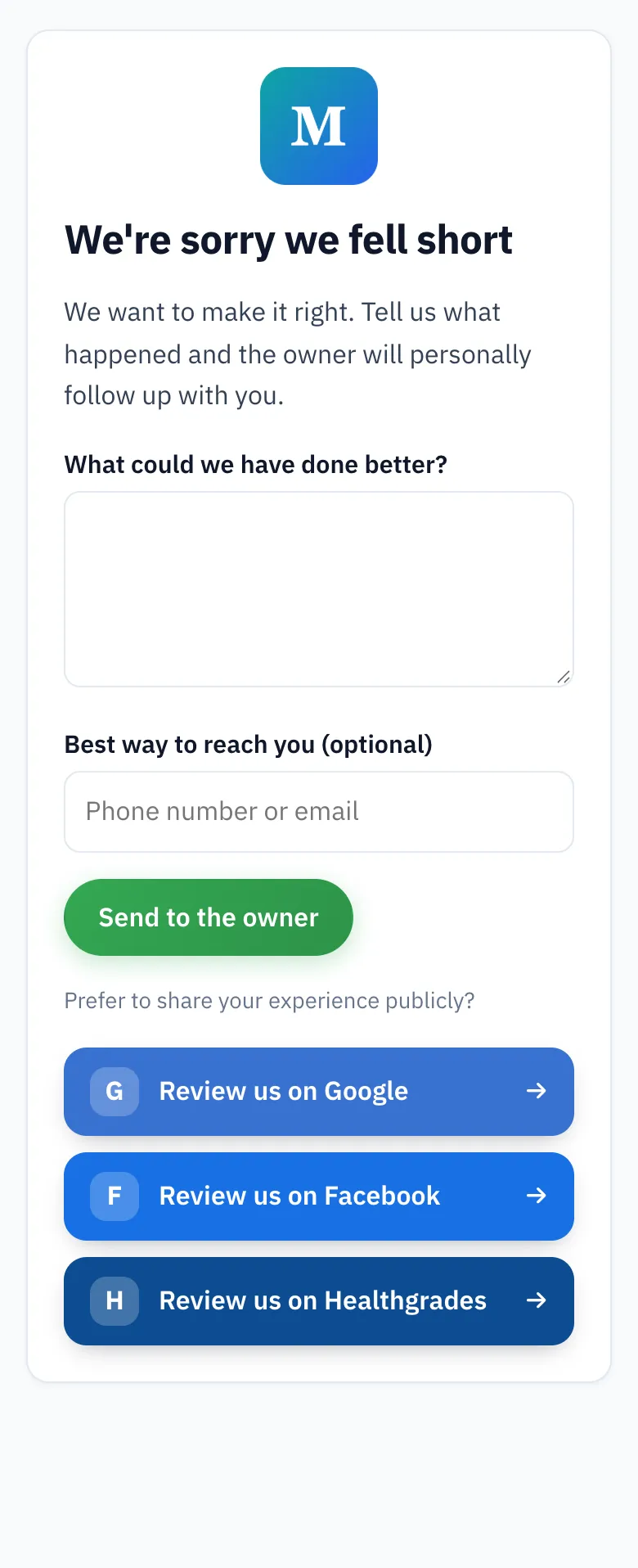
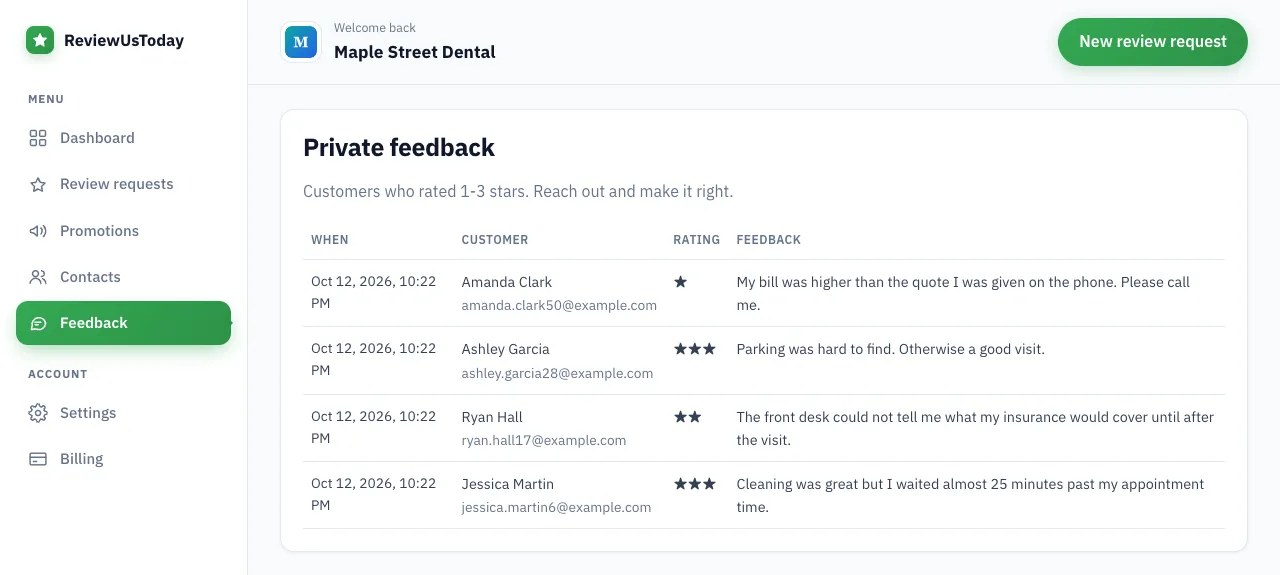
Anyone who rates 1 to 3 stars gets a private form to tell you what went wrong. The same page still shows every public review button.
What we see in a demo account
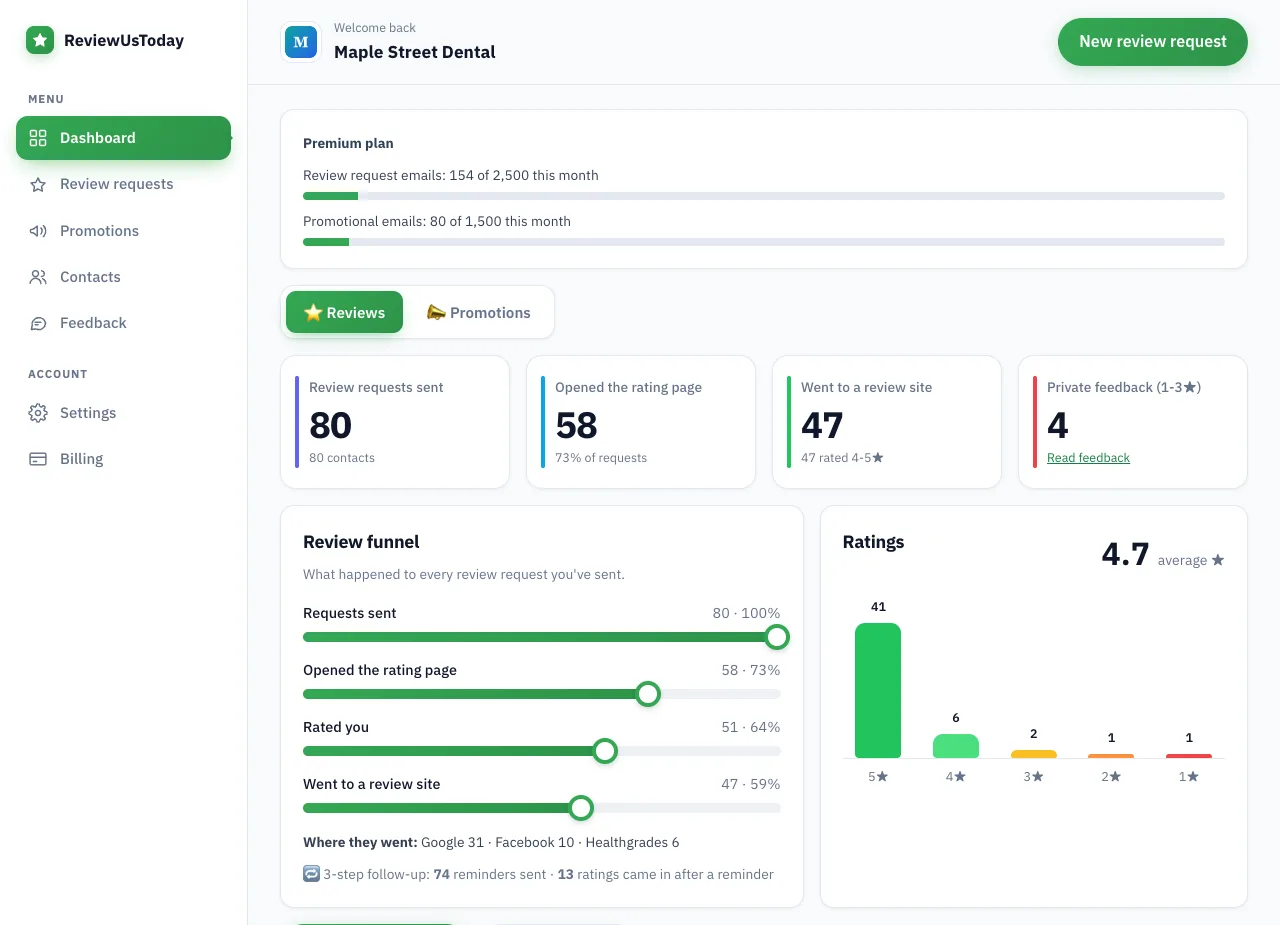
We ran a demo business, "Maple Street Dental," through ReviewUsToday with 80 sample customers. These are demo numbers with sample data, not a real customer's results. They show what the steady asking from the last section looks like on a dashboard.
| Step | Demo result |
|---|---|
| Review requests sent | 80 |
| Opened the rating page | 58 |
| Rated the business | 51 (average 4.7) |
| Rated 4 or 5 stars and went to a review site | 47: Google 31, Facebook 10, Healthgrades 6 |
| Left private feedback | 4 |
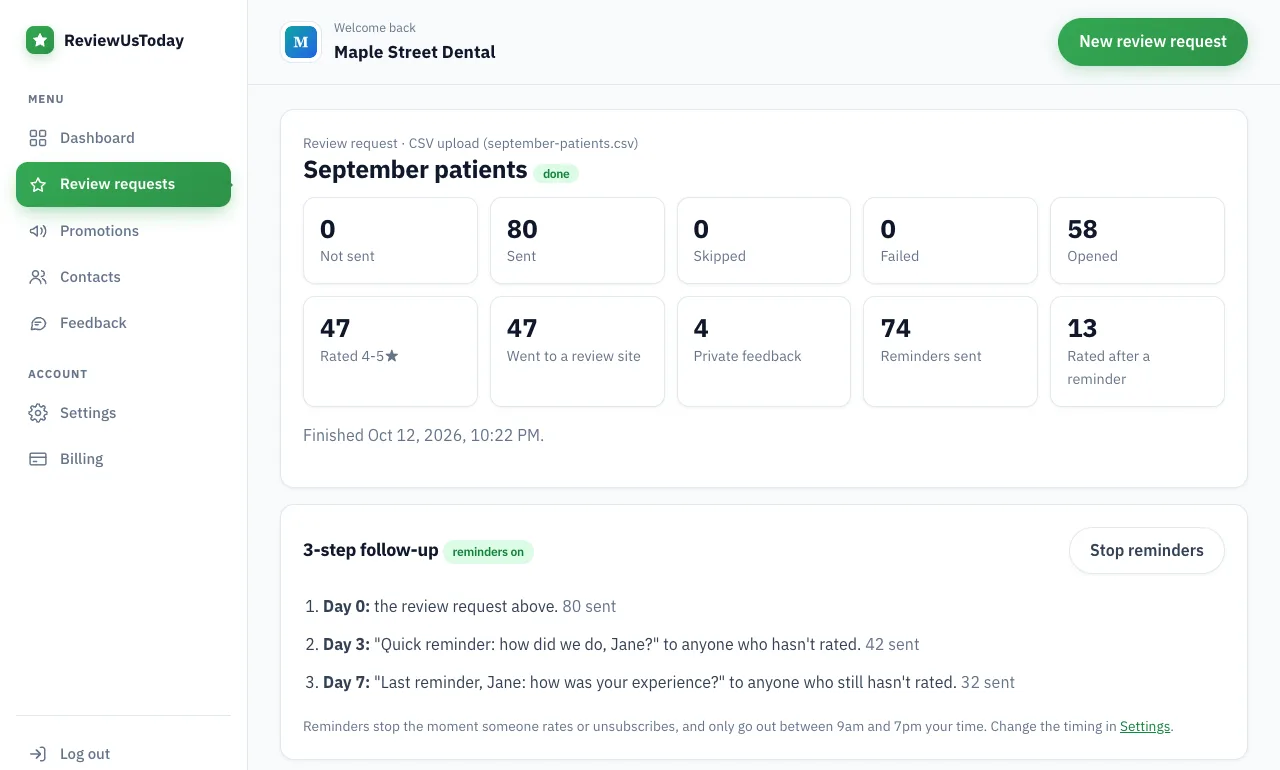
| Ratings that came in after a reminder | 13 (from 74 reminders) |
In a profile like this one, a single 1-star review shares the page with 31 new Google reviews instead of sitting there alone. And the 4 private notes arrive in the owner's inbox, where a fix costs a phone call instead of a public reply.
Where ReviewUsToday fits
ReviewUsToday can't delete, report or reply to Google reviews, and it doesn't monitor your profile. What it does is email every customer a one-tap review request with two automatic reminders, so new reviews keep arriving. Low ratings get a private feedback form, and public review buttons always stay on the page. See how review management works, or start a free trial.
Frequently asked questions
Can a business owner delete a Google review?
No. Only the person who wrote a review can delete it. An owner can report a review that breaks Google's policies, and Google decides whether to remove it.
How long does Google take to remove a reported review?
Google says review evaluation typically takes several days. You can check progress in the Reviews Management Tool, and appeal decisions arrive by email.
Will Google remove a negative review?
Not for being negative. Google's policy allows content that describes negative experiences in a respectful manner. It removes reviews that break a specific policy, such as fake reviews, harassment or conflicts of interest.
Can I report a fake Google review from a competitor?
Yes. Google's policy prohibits posting on a competitor's place to undermine its reputation. Report it from your Business Profile or the Reviews Management Tool and choose the reason that fits.
How many times can I appeal a Google review decision?
Once. If Google finds no policy violation, you can submit a one-time appeal from the Reviews Management Tool, covering up to 10 reviews at a time.
Sources
- Google Maps Help: Add, edit, or delete Google Maps reviews & ratings
- Google Business Profile Help: Report inappropriate reviews on your Business Profile
- Google Business Profile: Reviews Management Tool
- Google Business Profile Help: Report negative review extortion scams
- Google: Maps user-generated content policy (Prohibited & restricted content)
- FTC: Final rule banning fake reviews and testimonials (August 2024)
- BrightLocal: Local Consumer Review Survey 2026
Keep reading
How to respond to negative reviews
How to respond to negative reviews: a calm 5-step method, 8 templates for slow service, wrong orders, pricing, rude staff and fake reviews, and what to avoid.
How to get customers to leave reviews (and get more of them on Google)
How to get customers to leave reviews on Google: ask everyone, ask at the right moment, send a one-tap link and follow up. Policy-safe tactics and scripts.
Review gating: what it is, what Google and the FTC say, and what to do instead
Review gating means only sending happy customers to review sites. Here's what Google's policy and the FTC say, what is allowed, and a compliant review flow.