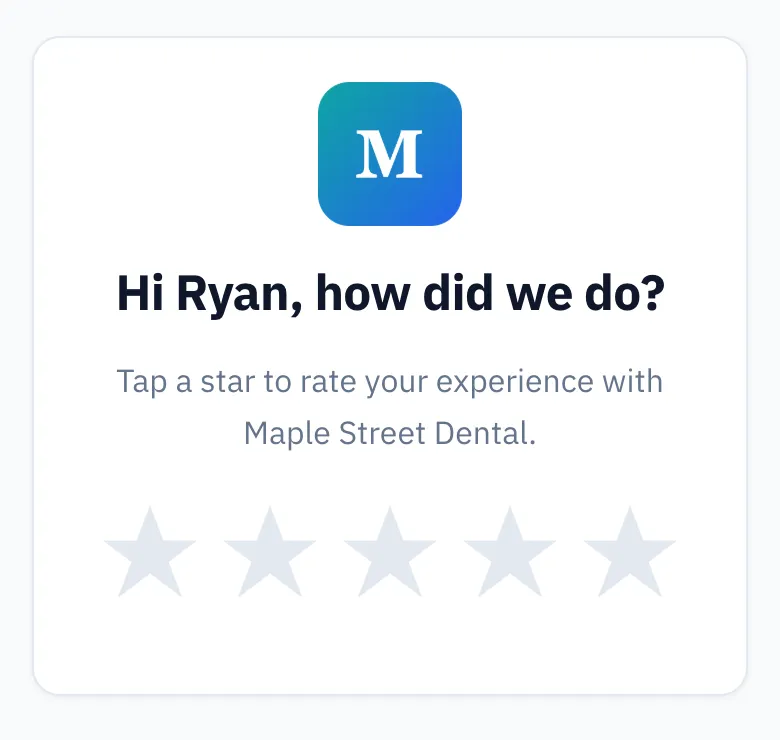
A customer feedback survey is a short set of questions you send after a visit to learn what went well and what didn't. For a local business, keep it to one tap: a 1-5 star rating, plus one optional open question. Send it by email within a day, and ask every customer the same way.
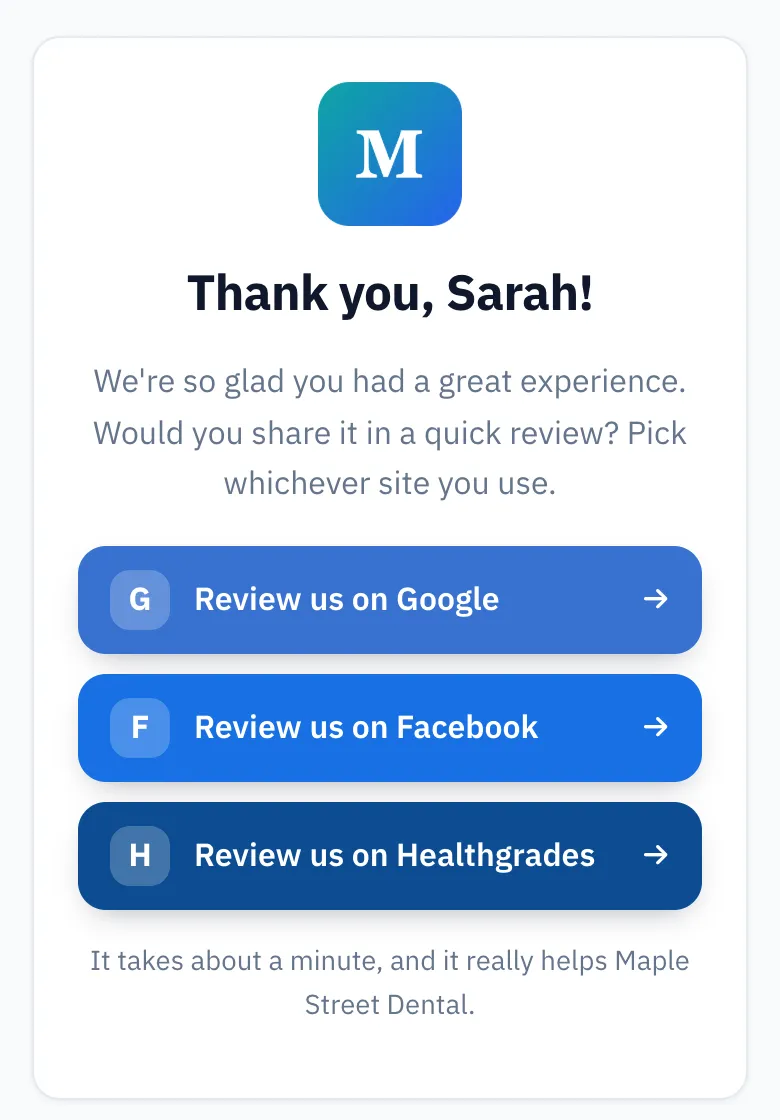
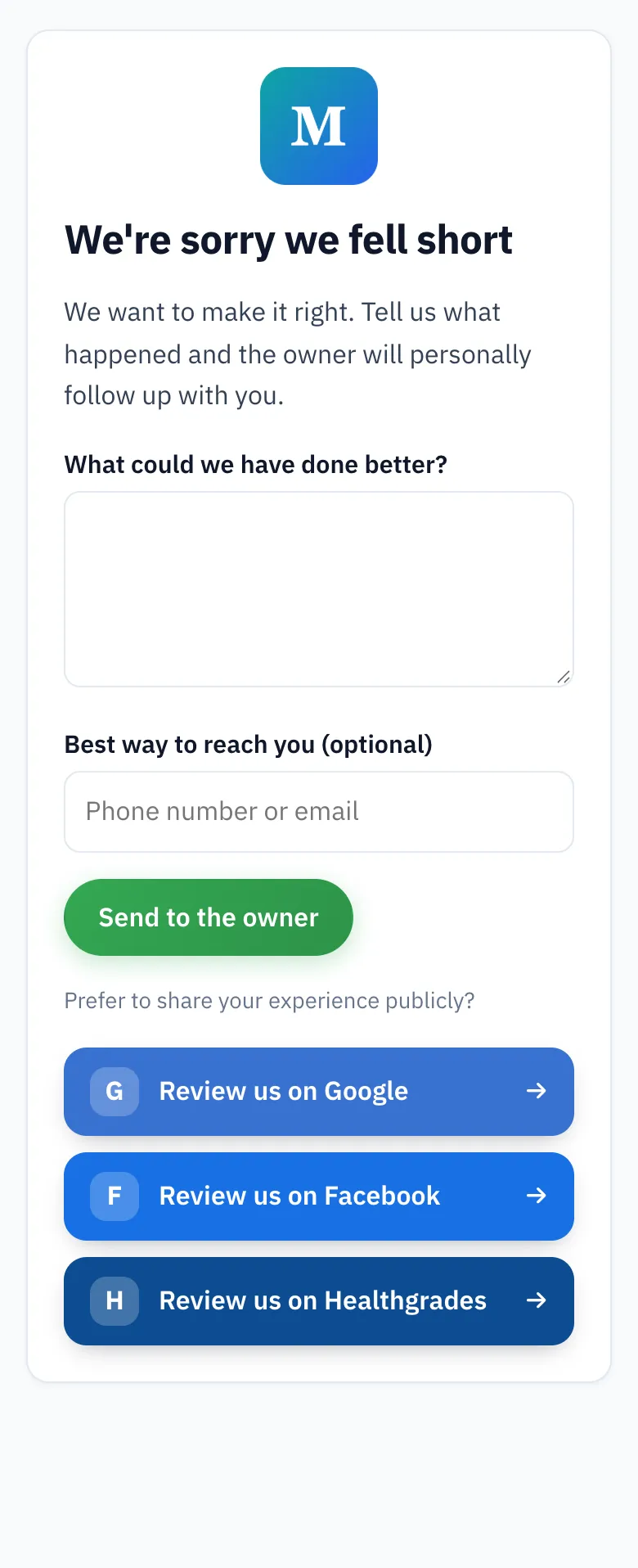
ReviewUsToday emails that one-tap star rating for local businesses. A 1-3 star rating opens a private feedback form that alerts the owner instantly, and every customer still sees the buttons to review the business publicly.
What are good customer satisfaction survey questions?
Good customer satisfaction survey questions are short, specific to the visit, and answerable in seconds. Start with one rating question ("How did we do?"). Then add one open question about the part of your service most likely to go wrong. Skip anything the customer would need to look up or explain at length.
Here's what that looks like for the businesses I'd expect to read this:
| Business | Rating question | Follow-up question | Skip this |
|---|---|---|---|
| Restaurant | How was your meal tonight? | Was there anything about the food or the wait we should fix? | Rating every course one by one |
| Salon or barber | How happy are you with your cut? | Did your stylist get what you asked for? | Questions about the products on the shelf |
| Dentist | How was your visit today? | Was booking, waiting or billing harder than it should be? | Anything that invites health details in a reply |
| Contractor or home services | How did the job go? | Did we leave your place as clean as we found it? | Questions about a job that isn't finished yet |
| Auto repair | How was your service? | Was the final bill what you expected? | Technical questions about the repair itself |
Notice what's missing: "How likely are you to buy more services in the next 12 months?" Nobody knows that. Nobody wants to be asked it while still digesting dessert, either.
Ask about the visit they just had, in the words they'd use to describe it to a friend. I'd write the follow-up question first, then the rating. The star tells you how they felt. The follow-up tells you what to fix by Thursday.
How do you write a customer feedback email?
A good customer feedback email comes from your business name and has a short subject line. It names the visit and asks one question the customer can answer with a single tap. Keep it under 100 words. Sign it from a real person, and put your address and an unsubscribe link at the bottom.
Here's each part, with an example from a made-up salon:
| Part | What to write | Sample wording |
|---|---|---|
| From name | Your business name, or a person at it | Rosa at Bluebird Salon |
| Subject line | Short and about their visit | How was your cut, Jamie? |
| First line | Name the visit so they know it's real | Thanks for coming in on Tuesday. |
| The ask | One question, answered by tapping | How did we do? Tap a star below. |
| Time promise | An honest estimate | It takes about ten seconds. |
| Sign-off | A first name | Rosa |
| Footer | Your business address and an unsubscribe link | Bluebird Salon, 12 Main St. Unsubscribe |
To send it:
- Export your customer list from your booking or invoicing software as a CSV.
- Remove anyone who hasn't agreed to hear from you.
- Send the email within a day of the visit.
- Send a reminder a few days later to anyone who didn't answer. Send one more at most, then stop.
The urge to add a paragraph about your family's 40-year passion for hair will be strong. Save it for the About page. Every extra sentence is one more chance for a busy customer to wander off and reheat their coffee. More wording ideas are in our review request email templates.
Which type of customer feedback survey should you use?
There are four common customer feedback survey types. You can ask for a single star rating, a customer satisfaction (CSAT) score, a Net Promoter Score (NPS) or an open text answer. For most local businesses, a star rating plus one open question gets the most answers for the least effort.
| Survey type | The question | Answer format | Best for |
|---|---|---|---|
| Single star rating | How did we do? | 1-5 stars, one tap | Every customer, after every visit |
| CSAT | How satisfied were you with [one part of the visit]? | A 1-5 scale from very unsatisfied to very satisfied | Checking one thing, like booking or wait times |
| NPS | How likely are you to recommend us to a friend or colleague? | 0-10 | Tracking loyalty over months, across many customers |
| Open text | What could we have done better? | A short written answer | Finding the actual thing to fix |
NPS comes from Bain & Company. According to Bain's Net Promoter System site, you ask that recommend question on a zero-to-ten scale. Your score is the percentage of promoters (those who scored 9 or 10) minus the percentage of detractors (those who scored 0 to 6).
It's a useful number for a business with lots of locations and lots of answers. For a single salon, a score on its own doesn't tell you what to change on Monday. It also asks the customer to pick from eleven numbers, which is a lot of choice for someone who just wanted a haircut.
How long should a customer feedback survey be?
A customer feedback survey for a local business should take under a minute, and ideally one tap. One rating question plus one optional open question is enough. Each extra question gives a busy customer another reason to stop, and the answers you lose are often the most honest ones.
Think about where your email gets read: in a parking lot, in a checkout line, or on the couch with one eye on the TV. A 15-question form on a phone is a big ask from someone holding a toddler and a bag of groceries.
Your customers are also being asked a lot. In BrightLocal's Local Consumer Review Survey 2026, 78% of consumers said they'd been asked to write a review in the last 12 months. A one-tap ask stands out in that pile. A long form just joins it.
Here's the order I'd use. Rating first, with one tap and no login. The open question second, and only if they want to answer it. Nothing third.
When should you send a customer feedback survey?
Send a customer feedback survey within 24 hours of the visit, while the details are fresh. Same day works for restaurants and dentists. A day or two later works better for contractors and auto repair, once the customer has lived with the result. Send one or two reminders, then stop.
| Business | When to send | Why |
|---|---|---|
| Restaurant | Same evening or next morning | The meal is still the most recent thing they remember |
| Salon or barber | The next day | They've seen the cut in their own mirror, not just yours |
| Dentist | Same day, after the appointment | Booking, waiting and billing are fresh |
| Contractor or home services | 1-2 days after the job is finished | They've used the new thing and seen the cleanup |
| Auto repair | 1-2 days after pickup | They've driven the car and opened the invoice |
Send during normal hours, too. Nobody wants a survey landing at 11pm, right next to their insomnia. For reminders, one after about three days and a last one around day seven is plenty. A fourth email starts to read less like a question and more like a parking ticket.
Can you combine a feedback survey with review requests?
Yes, you can combine a feedback survey with review requests, as long as every customer gets the same chance to post a public review. What you can't do is send only happy customers to Google and steer unhappy ones somewhere private. That's called review gating, and Google's policy bans it.
Google's Maps user-generated content policy covers this in its "Rating Manipulation" section. It says Google doesn't allow merchants to "Discourage or prohibit negative reviews, or selectively solicit positive reviews from customers." The same section says biased reviews "are not allowed and will be removed from Maps."
Plenty of feedback tools were built to do exactly what that sentence describes: ask for a rating, then show the Google button only to people who tapped 4 or 5 stars. Here's the difference side by side:
| Step | Gated flow (not allowed) | Honest flow |
|---|---|---|
| Who gets the request | Everyone | Everyone |
| After 4-5 stars | Google review button | Google review button, or a choice of sites |
| After 1-3 stars | A private form only | A private form and the public review buttons |
| Can an unhappy customer post publicly from the page? | No | Yes, always |
That's how ReviewUsToday's version works. A 1-3 star rating opens a short private form ("What could we have done better?") that emails you an instant alert. The same page still shows buttons for every public review site, under "Prefer to share your experience publicly?" The form is an offer, not a gate. You can see the flow on our review request software page, and our guide to review gating goes deeper.
What does one round of feedback look like in a demo account?
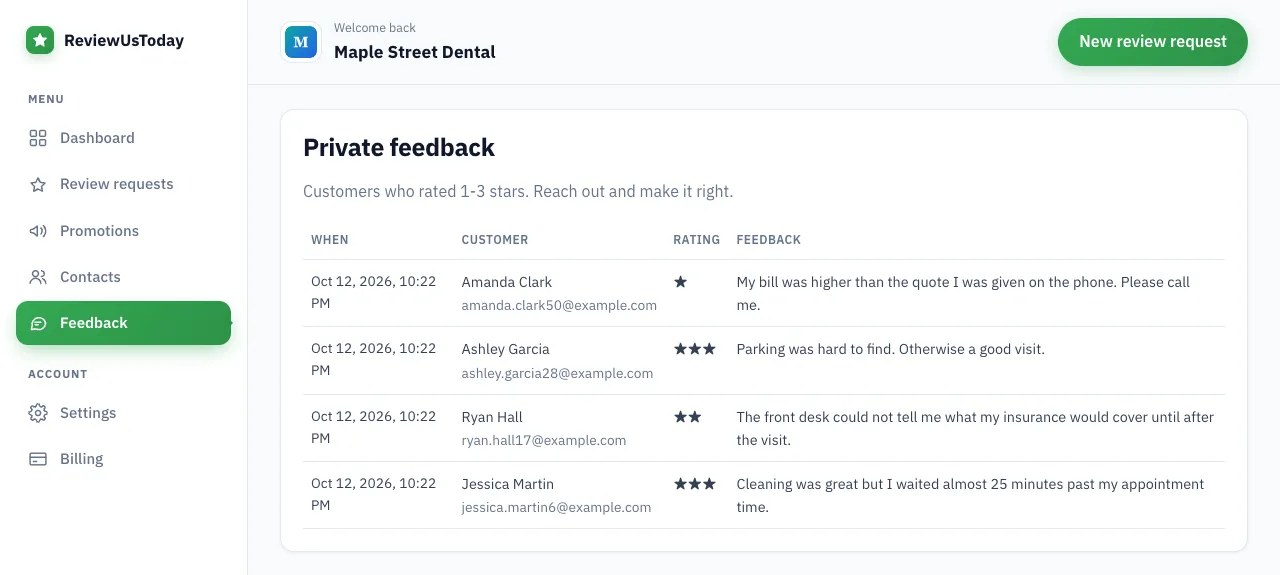
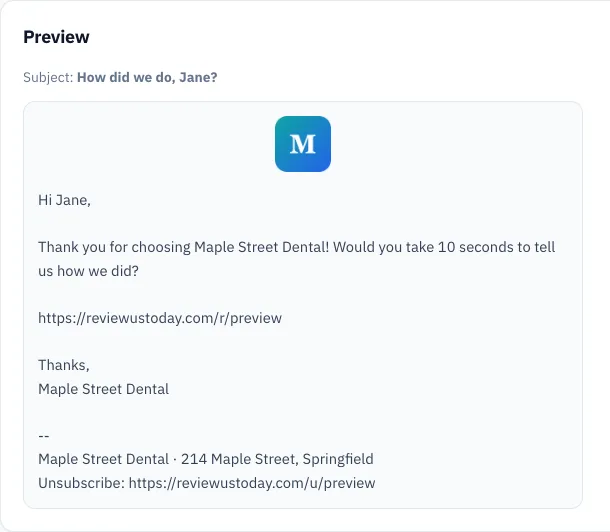
We ran a fictional practice, Maple Street Dental, through ReviewUsToday with 80 sample customers. It's a demo account with sample data, not a real business's results. It shows what one round of rating requests, reminders and private feedback looks like on the dashboard.
| Step | Demo result |
|---|---|
| Rating requests sent | 80 |
| Opened the rating page | 58 |
| Rated the practice | 51 |
| Rated 4-5 stars and went to a review site | 47: Google 31, Facebook 10, Healthgrades 6 |
| Left private feedback | 4 |
| Reminders sent | 74 |
| Ratings that came in after a reminder | 13 |
| Average rating | 4.7 |
The 4 private notes are the part I'd read first, because they tell you what to fix. The 13 ratings after a reminder are a decent argument for the follow-up you were too polite to send. For replying to the harder ones, see how to respond to negative reviews.
Where ReviewUsToday fits
ReviewUsToday sends the one-tap star rating email, plus reminders on day 3 and day 7. Ratings of 1-3 stars get a private feedback form, with every public review button still on the page. It isn't a full survey builder: there are no multi-question forms, no NPS scoring and no text messages. If you want the short, honest version of a feedback survey tied to review requests, see how review management with ReviewUsToday works.
Frequently asked questions
What is a customer feedback survey?
A customer feedback survey is a short set of questions a business sends after a visit. It shows what went well and what didn't. For a local business, one star rating and one optional open question is usually enough.
How many questions should a customer feedback survey have?
One or two. A single rating question plus one optional open question gets you a score and a reason without asking much of the customer.
Can I send only happy customers to Google?
No. Google's policy says merchants may not discourage negative reviews or selectively solicit positive ones. Ask every customer the same way, and make sure unhappy customers can still post publicly.
Can I offer a discount for filling out a survey?
Don't tie any reward to a Google review. Google's policy bans incentives such as payment, discounts or free services in exchange for posting a review.
When should I send a customer feedback email?
Within 24 hours of the visit for most businesses, or a day or two later for jobs the customer needs to live with first. Send one or two reminders to people who didn't answer, then stop.
Sources
Keep reading
Review gating: what it is, what Google and the FTC say, and what to do instead
Review gating means only sending happy customers to review sites. Here's what Google's policy and the FTC say, what is allowed, and a compliant review flow.
Review request template: 7 emails you can copy and send today
Copy-paste review request template emails with subject lines: after a service, after a purchase, reminders, a short version, an owner note and a clinic version.
How to ask for a review: scripts, examples and timing
How to ask for a review without feeling awkward: word-for-word scripts for in person, email and receipts, when to ask by business type, and Google's rules.